|
 |
Transferring Alarm Notification Groups: How the Networked Robotics Tempurity™ Monitor Stores Alarm Notification Parameters in the RegistryUpdated March 2023 IntroductionThis document describes how to back up and transfer Tempurity Monitor alarm notification group parameters, such as e-mail destination addresses and the relevant alarm stages on which alarm notifications are to be sent. It describes how alarm notification information can be moved from one Tempurity Monitor computer to another. The Tempurity Monitor stores all alarm notification groups and their parameters in the Windows Registry rather than in data files. The examples in this document were originally written for Windows XP but are relevant up to Windows 10. Most customers have a "central" Tempurity Monitor that is run by administrators. These may have complex alarm groups with many entries that need to be transferred at times to other computers. In this case alarm notification data can easily be transferred via the registry as described below. The Tempurity Monitor is capable of being a highly distributed - even a "personal" alarm system. In this approach each user with control of a Tempurity Monitor on any computer specifies his or her "personal" alarm notification criteria. These are stored on the computer on which the Tempurity Monitor is running in the Windows registry as described. Alarm notification parameters such as destination email, destination phone, or cell phone provider are under full control of users running a Tempurity Monitor on their desktop. They can change these parameters whenever they want, and thus are responsible for their own critical information concerning the quality of their samples. How Tempurity Monitor Alarm Notification Parameters are Stored in the Windows Registry>You can examine your current alarm notification groups by manually looking at the registry: In Windows choose:
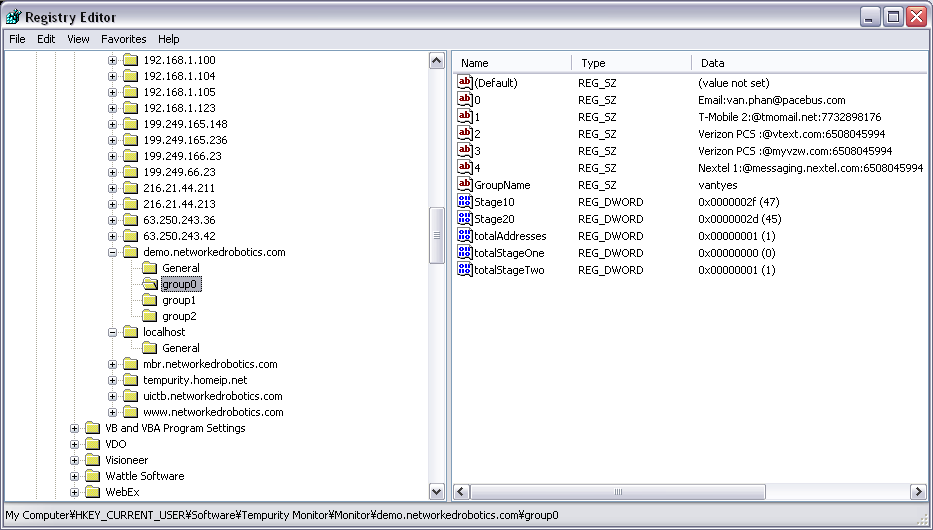
The relevant alarm notification groups and their alarm notification parameters are stored in the registry data tree under the following branches of the data tree:
HKEY_CURRENT_USER Software Tempurity Monitor and then the executable which usually will be... Monitor
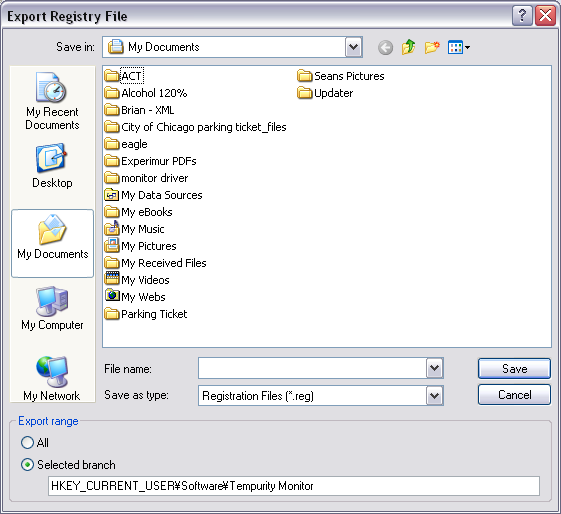
Saving Alarm Notification Groups in a Registry Export FileYou can save the Tempurity Monitor Alarm Notification Groups by doing a Registry Export command. Make sure you have chosen the “selected branch” option.
A file with a ".reg" extension will be created with the relevant information.
Importing Alarm Notification Groups from one Monitor into another Using a Registry Export FileThe instructions above show how to create a registry export file that holds the alarm notification parameters for a Tempurity Monitor. Assuming that this has been done, you can now load these export keys into the registry on another computer running a different instance of the Monitor using the Regedit "Import" command.
Alarm Notification Groups and Tempurity ServersAlarm Notification Groups are only relevant to the specific Tempurity Server currently being watched by a Tempurity Monitor. Thus when you change the Tempurity Server name in the Tempurity Monitor it will seem as if the alarm notification groups will disappear or change. By changing the Tempurity Server name back again, the alarm groups will reappear. Sometimes- as in the case of a required IP address reassignment - you must change the server name, but want to keep the alarm groups. If you have a complicated or detailed set of alarm groups, you can use the methods described above to copy alarm groups in the registry from one Tempurity Server to another in the registry thus avoiding the need to reenter the information that is already stored in the computer. |